
Authentication
Authenticate with the ZapCloud API and Zaptec integrations API by requesting an OAuth bearer token and sending it in the Authorization header for protected API requests.
Authentication mechanism
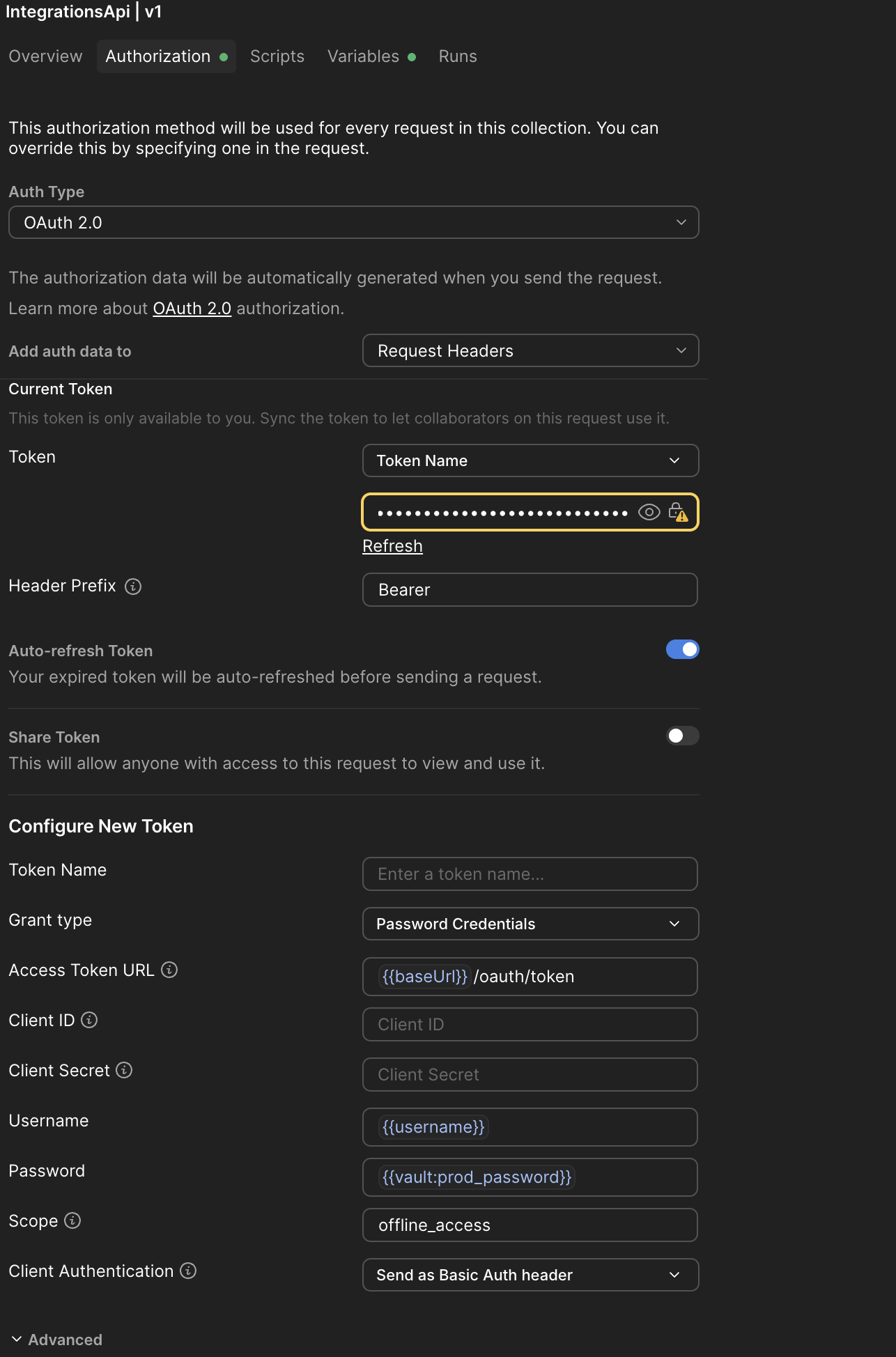
The ZapCloud API and Zaptec Integrations API employ the OAuth 2.0 Resource Owner Password Credentials (ROPC) Grant type. This method involves exchanging user credentials directly for an access token, which is then used to authorize subsequent API requests. See the Zaptec API reference and the Integrations API reference.
The current OAuth 2.0 Password grant type method will be phased out in the future to make way for the OAuth 2.0 Code grant.
Authentication flow
The authentication process involves obtaining an access token and using it for API requests. You need a user group with the appropriate permissions (owner or service). Request access through your country’s Zaptec business representative or Zaptec Support.
After obtaining your user group credentials, add at least three users: one service account for calling API endpoints and separate users for Portal, Zaptec app, and account configuration access. Refer to the API usage guideline and API fair use policy.
Step 1: Requesting an access token
To begin interacting with the API, your application must first obtain an OAuth Bearer Token.
Do not hardcode Zaptec usernames, passwords, or access tokens in your application. Store credentials in secure configuration, environment variables, or a secrets manager.
- HTTP Method:
POST - Endpoint:
https://api.zaptec.com/oauth/token
Request details
- Headers:
Content-Type: application/x-www-form-urlencoded
- Body Parameters (form-urlencoded):
grant_type: Must be set topassword.username: The username (email) of your service account in your user group.password: Your service account password.
Token request example
curl --location 'https://api.zaptec.com/oauth/token' \
--header 'Content-Type: application/x-www-form-urlencoded' \
--data-urlencode 'grant_type=password' \
--data-urlencode '[email protected]' \
--data-urlencode 'password=your_password' \
--data-urlencode 'scope=openid'
Successful response
A successful request returns a JSON object containing the access_token and other relevant information.
{
  "access_token": "your_received_access_token",
  "token_type": "Bearer",
  "expires_in": 3600,
  "scope": "openid"
}
Step 2: Using the access token
Once an access_token is obtained, include it in the Authorization header for all API calls to protected resources.
- Header format:
Authorization: Bearer {access_token}
(Replace{access_token}with the token value received.)
API call with an access token
GET /api/some_protected_resource
Host: api.zaptec.com
Authorization: Bearer your_received_access_token
Treat
access_tokenvalues as sensitive credentials. Store tokens securely, avoid exposing them in browser code or URLs, and request a new token before the current token expires.
Sample setup using Postman
Updated 6 days ago